Ray-tracing a black hole in WebGL2
How my Event Horizon demo bends light around a Schwarzschild black hole in a fragment shader, and the loop restructure that made it 20 times faster.
· Updated · 5 min read
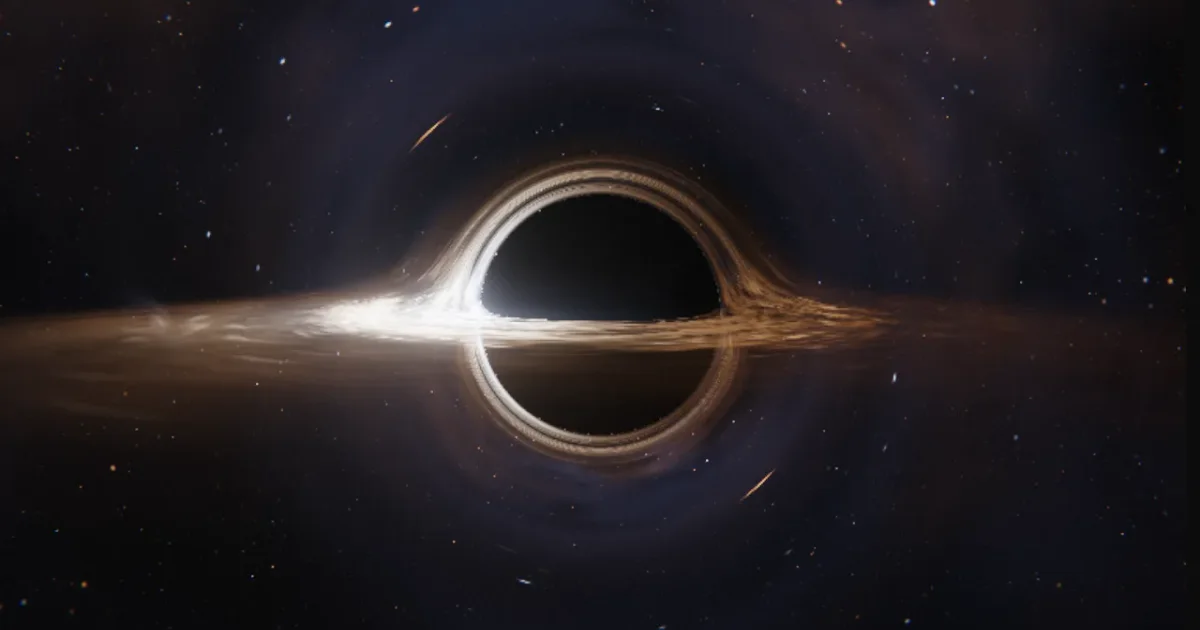
You can render a black hole in real time by tracing one bent light ray per pixel in a fragment shader. Each ray starts at the camera, is nudged by a gravity term at every step, and ends in one of three ways: it falls into the horizon and the pixel stays black, it crosses the accretion disk and picks up light, or it escapes and samples the sky.
I did this in raw WebGL2 for Event Horizon. This post covers the physics I used, the loop that made the shader fast, and where I simplified on purpose.
The bending equation#
The black hole does not spin, which makes it a Schwarzschild black hole, and the shader works in units where its radius, Rs, is 1. In those units a ray's acceleration has a simple form in Cartesian coordinates:
a = −1.5 · h² · r / |r|⁵
where r is the position, v the velocity and h = |r × v| the angular momentum, which stays constant along the ray. The ray is integrated with velocity Verlet. The step size is proportional to the radius, so it is about seven times finer near the photon sphere, where light can circle the hole, than far away. The loop takes at most 560 steps on the high tier and 200 on the light tier.
A ray that drops below the horizon stays black. One that escapes samples the sky in its final direction.
The thing that makes the picture read as a black hole is that the far side of the disk is lensed into an arc over the top and under the bottom of the shadow. This comes from the bending itself: rays bend, so a ray aimed above the hole can still cross the disk plane behind it.
The disk#
The disk is a thin slab from just inside the innermost stable circular orbit (ISCO), which sits at 3 Rs for a non-spinning hole, out to a ragged edge around 12 Rs, with a faint halo to 19 Rs. The shader builds it from noise and a lookup texture:
- Gas: fractal noise in polar coordinates, stretched along the orbit into filaments, with a two-armed spiral, rare bright clumps and dark dust lanes.
- Rotation: every ring turns at the Keplerian rate, inner rings faster, so features shear into trailing spirals. Two copies of the pattern restart half a period apart and cross-fade, so the shear never winds into a smear.
- Colour: temperature follows the thin-disk profile with a hotter rim at the ISCO. A blackbody lookup texture, filled from a unit-tested TypeScript function, turns temperature into colour. The peak temperature is made up.
One side of the disk is brighter. Gas orbits at sqrt(M / (r − 2M)) of light speed, where M is half of Rs, so about half the speed of light at the ISCO. The shader combines the special-relativistic Doppler shift with the gravitational redshift of a static observer into a factor g. Brightness scales with g⁴ and colour temperature with g. The Doppler factor is approximate, and there is no light travel time.
The loop that was 20 times too slow#
My first version shaded the disk inside the march loop, at every crossing. It looked right and ran at 60 frames per second according to the frame clock, but GPU timer queries showed the shader was about 20 times slower than it needed to be. The most likely cause was register pressure: the loop used so many registers that the GPU could not run many pixels at once.
The fix was to split the work. The march loop now only records up to four crossings of the disk plane and buckets jet and probe light between them. The expensive disk shading and the front-to-back compositing run after the loop. After the split, the timer queries read 4 to 11 ms per frame.
The lesson I took from it: measure GPU time with timer queries, not with requestAnimationFrame deltas. In Event Horizon, adding ?debug to the URL writes the smoothed GPU time to a data-gpu-ms attribute on the canvas.
Smooth photon rings#
Near the shadow, thin images of the disk appear as rings: light that went once, twice or more around the hole before escaping. With one sample per pixel they come out as dots. Pixels whose ray came within 3.4 Rs of the hole are traced four times with sub-pixel offsets and averaged on the high tier, and the thin rings read as smooth lines. Sky light that skimmed the photon sphere is faded.
Performance numbers#
I measured with GPU timer queries on an RTX 4060 laptop GPU. It takes 4 to 11 ms per frame at 1440×900, and about 5 to 8 ms on a phone-sized canvas at pixel ratio 2. I have not run it on a real phone.
Other limits keep the cost bounded:
- The scene renders at 0.6 of the canvas resolution into a half-float buffer, and bloom and tone mapping scale it up.
- Pixel ratio is capped at 2, and at 1 on the light tier. The light tier also takes fewer steps, one slab sample and no supersampling.
- A governor drops to the light tier once the smoothed frame time stays over 22 ms for two seconds.
?quality=lowstarts there. - The camera stops at 5.5 Rs. Nearer than that the shadow grows wider than the field of view and the screen turns black.
- The loop runs only while something moves and only while the canvas is on screen and the tab is visible.
Reduced motion#
With reduced motion on, there is no idle orbit, no disk rotation, no probe movement, no travelling jet knots and no throw momentum. The page opens on a still, composed frame, and the view changes only on your input, cutting straight to presets.
What I simplified#
This is a picture, not a simulation. The black hole does not spin, so the shadow stays round. The disk is a thin, artistic slab with a made-up peak temperature, the Doppler factor is approximate, and there is no light travel time. A spinning (Kerr) hole would need a different geodesic equation. Wikipedia has short definitions of the photon sphere and the innermost stable circular orbit.
What I could not compare#
I have not compared my images with a published black-hole renderer, so I cannot say how close the disk brightness is to a real accretion flow. The timing numbers come from one machine.