WCAG 2.2 target size: the 24 pixel rule
What WCAG 2.2 success criterion 2.5.8 asks for, how the spacing exception works, and the small tag links that failed an accessibility audit on this blog.
· Updated · 4 min read
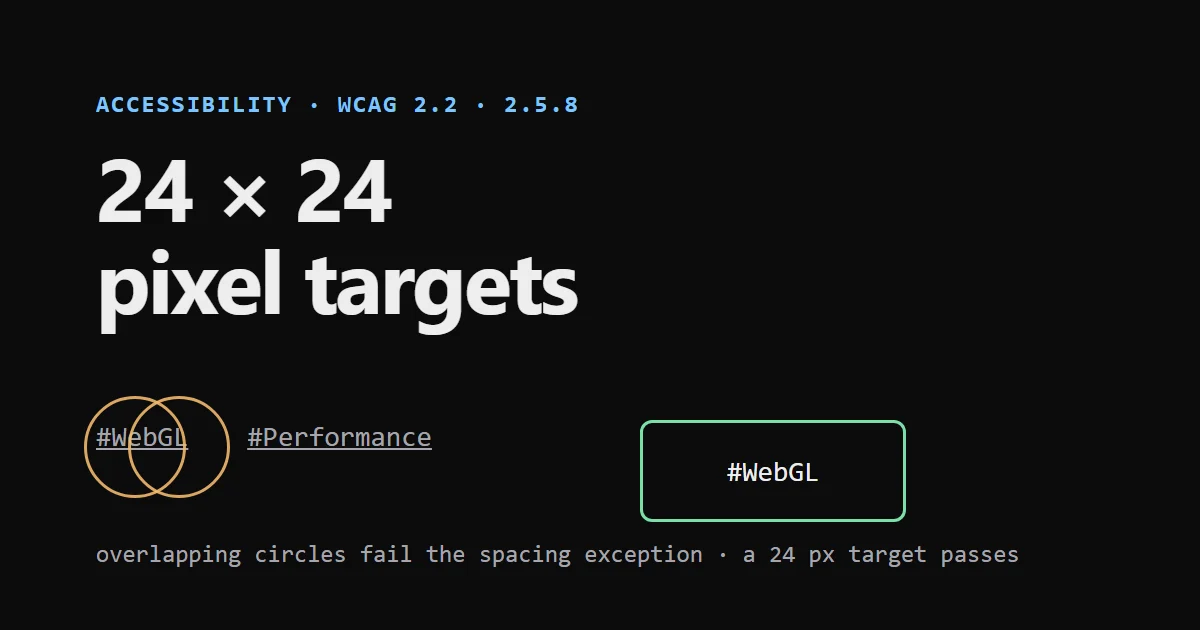
WCAG 2.2 success criterion 2.5.8, Target Size (Minimum), is a Level AA rule: the target of a pointer input must be at least 24 by 24 CSS pixels, with a few exceptions. The one that matters most in practice is spacing. A target smaller than 24 pixels still passes if a 24 pixel circle drawn over it does not intersect another target or the circle of another undersized target.
I ran into it on this blog. A Lighthouse audit flagged my tag links, and the fix was three utility classes. This post explains the rule and what happened.
The rule#
The W3C's Understanding document gives the text: "The size of the target for pointer inputs is at least 24 by 24 CSS pixels, except when" one of these applies:
- Spacing. Undersized targets are spaced so that their 24 pixel circles do not intersect another target or another undersized target's circle.
- Equivalent. The same function is available through another control on the same page that meets the criterion.
- Inline. The target is in a sentence, or its size is constrained by the line height of the surrounding text.
- User agent control. The size is set by the browser and not changed by the author.
- Essential. A particular presentation is essential or legally required for the information.
To check spacing, draw an imaginary circle with a 24 pixel diameter, centred on the target's bounding box. For a rectangular target, that is its centre. If that circle does not touch another target, or another undersized target's circle, the exception applies.
What else is new in WCAG 2.2#
WCAG 2.2 was published on 5 October 2023. The W3C lists nine new success criteria and one removed:
| Criterion | Level |
|---|---|
| 2.4.11 Focus Not Obscured (Minimum) | AA |
| 2.4.12 Focus Not Obscured (Enhanced) | AAA |
| 2.4.13 Focus Appearance | AAA |
| 2.5.7 Dragging Movements | AA |
| 2.5.8 Target Size (Minimum) | AA |
| 3.2.6 Consistent Help | A |
| 3.3.7 Redundant Entry | A |
| 3.3.8 Accessible Authentication (Minimum) | AA |
| 3.3.9 Accessible Authentication (Enhanced) | AAA |
The removed criterion is 4.1.1 Parsing. I only read the target size criterion in full for this post, so I do not describe the others beyond their names.
What failed on my blog#
My blog's tag links, the small #Motion and #WebGL labels under each post, were set in a small mono font. Each link was 16 pixels tall. Lighthouse's accessibility audit reported them under the target-size check on the blog list and on page two:
- Target has insufficient size: for example 43.2 by 16 pixels, where 24 by 24 is the minimum.
- Target has insufficient space to its closest neighbours: the safe clickable space had a diameter of 18 pixels instead of at least 24.
Two things made it fail. The links were 16 pixels tall, and the gap between lines was too small for the spacing exception to apply. The inline exception did not help, because the tags are a list of links on their own and not words inside a sentence.
The fix was to make each link at least 24 pixels tall:
<Link className="inline-flex min-h-6 items-center text-fg-muted underline ...">min-h-6 is 1.5rem, which is 24 pixels at the default font size. After that change, the audit gave 100 for accessibility on the list pages.
How to find these in your own pages#
- Lighthouse and axe both have a target size check. It is cheap to run and catches the common cases.
- My HTML Accessibility Checker has a target size check in its bookmarklet: run it on a live page and it lists each target under 24 by 24 pixels whose 24 pixel circle hits a neighbour, with its size and that neighbour.
- A visual check. Draw the 24 pixel circles on a screenshot. Crowded rows of small links, pagers, icon buttons and tag lists are where the spacing exception tends to fail.
- Make the clickable area bigger than the visible one. A link can be 24 pixels tall with padding even if the text is small. For touch screens, bigger is better still.
Limits of an automated check#
I checked the pages with Lighthouse, which uses the axe rules, and not with a manual audit against every WCAG 2.2 criterion. A passing automated check does not mean a page conforms. This post is not legal advice, and I did not read the legal requirements for any country.