Three.jsTypeScriptCanvas texturesCSS ModulesVitest
Controls
- Drag (mouse, or one finger sideways) to turn the planet; it keeps turning with momentum. Vertical swipes still scroll the page
- Hover a beacon for its name; click or tap it to fly in and open the station panel with the clip and a link to the example
- The arrows at the bottom step through the stations; the name between them opens the current one
- Keyboard: focus the planet, then the arrow keys move between stations, Enter opens one and Escape goes back
- The index under the planet lists every station as a plain link, with Locate to show it on the planet
- Add ?quality=low to the address to force the light tier
Needs WebGL. Without it, or if the graphics context is lost, the poster and the index of links stay. Respects the reduced-motion setting: no idle spin, no momentum and no camera flights, the planet cuts straight to the chosen station and the panel shows the still instead of the clip.
Questions
How does the globe know which examples to show?
The stations are derived from the Lab's content list: every published example listed on the 3D page that has a card image. A unit test fails when the bundled list and the content list drift apart.
How are the stations spread over the planet?
They sit on a Fibonacci sphere (golden-angle spiral) limited to 62 degrees of latitude, which spaces any number of points evenly and keeps them away from the poles.
How does the camera fly to a station?
The station's latitude and longitude give the yaw and pitch that turn it to face the camera; both are eased together with the camera distance, taking the short way round.
Is the planet a 3D model file?
No. The sphere, beacons and ring are built with Three.js at load time, and the plating, seams and rivets are drawn into canvas textures in code.
How it’s built
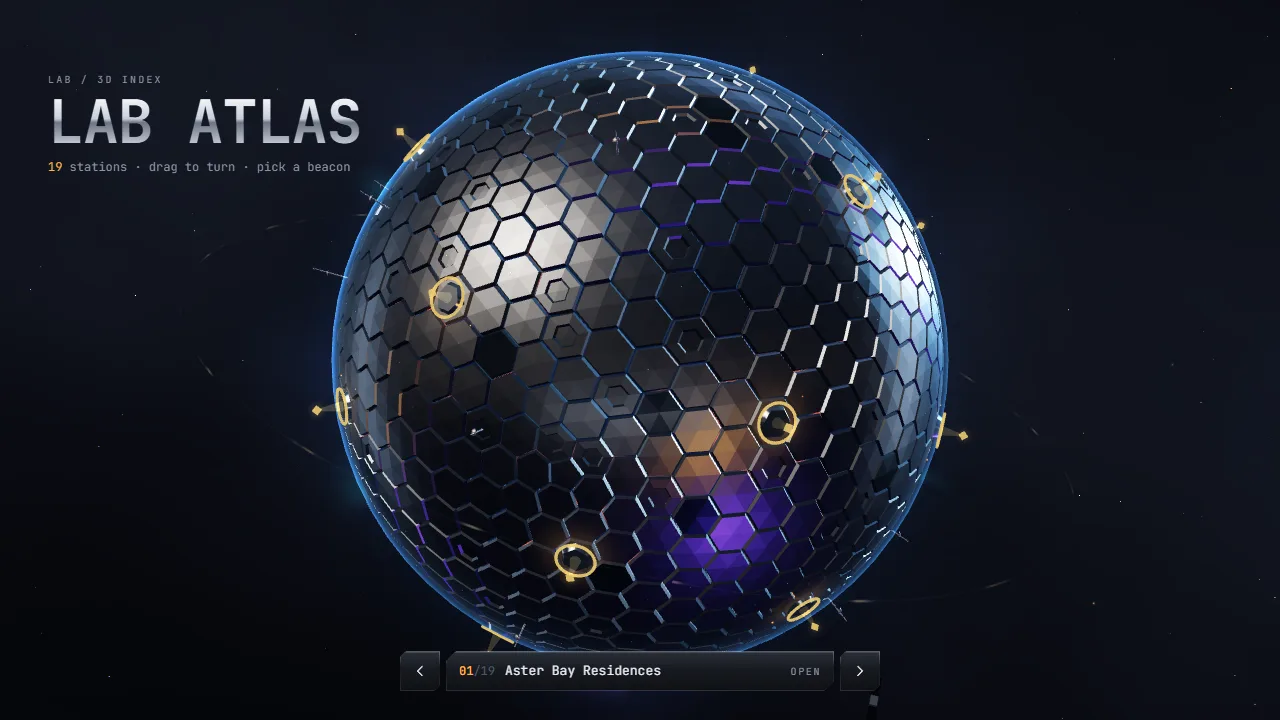
Lab Atlas is a 3D menu: a chrome planet with one beacon for every published example on the 3D page, and a panel that opens the chosen one.
- Stations from the content list. The stations are the published 3D examples (own or cross-listed) that have a card, in the topic's order. They are bundled as a small
stations.json (about 14 KB) instead of importing the whole content file into the chunk; a Vitest check rebuilds the list from src/content/experiments.ts and fails when the two drift apart (UPDATE_ATLAS=1 rewrites it). - Placement. A Fibonacci (golden-angle) sphere spreads any number of stations evenly, limited to 62° of latitude so none sits on a pole.
- Planet in code. Plain Three.js, no model files. The plating is drawn into canvas textures at load time: a hex grid in equirectangular space (fewer cells toward the poles), seams and rivets in a bump map, a varied roughness map, and a glow mask for the lit seams. Reflections come from Three.js
RoomEnvironment through PMREMGenerator, with a warm key and a cool rim light; a back-face Fresnel shell gives the halo. - Turntable and flights. A small hand-written turntable: drag turns the planet (yaw and pitch), release keeps the spin with exponential damping. Choosing a station tweens yaw (the short way round), pitch, camera distance and a view offset together, so the beacon faces the camera and the planet moves aside for the panel without the sphere being distorted.
- Picking. A raycast against the planet and invisible hit spheres on the beacons; a beacon behind the planet is blocked by it. Hover labels are projected each frame and moved with a transform, without React renders.
- Accessible. The canvas is hidden from assistive tech. The planet is focusable with arrow keys, Enter and Escape, a live region announces the station, and an ordered list below links every example directly.
- Lifecycle. Rendering pauses off-screen and in hidden tabs, context loss shows the poster, and every geometry, material and texture is disposed on unmount. Under reduced motion there is no idle spin, momentum or flight, and the panel shows the still card instead of the clip.
- Outposts. Every station gets its own small base, laid out from a hash of its slug: a hex pad with chasing edge lights, a soft contact shadow and four to six structures (domes, towers with a scanning beam, rotating radar dishes, pylons, lit modules) joined to the pad by pipes. Shared geometry and materials keep it to a few hundred cheap meshes.
- Light. No HDRI: a small studio of emissive panels is baked once through PMREM for the chrome. A shader patch adds an amber glow from each beacon to the plates around it.
- Background. A near-black sky dome with a very faint cool nebula, a sparse star layer and a rare faint shooting star (one quad in camera space), kept quiet on purpose so the planet and the amber stations carry the picture. All of it stands still under reduced motion.
- Level of detail. At idle each station is only a pad, a ring and a short beam; its full outpost grows in on hover, selection or when the camera is close, so the planet reads calmly from afar.