How a B2B product configurator works
How a made-to-order product configurator fits together: engineering rules with auto-fix, one bill of materials and an instant quote, from my Rackwise demo.
· Updated · 4 min read
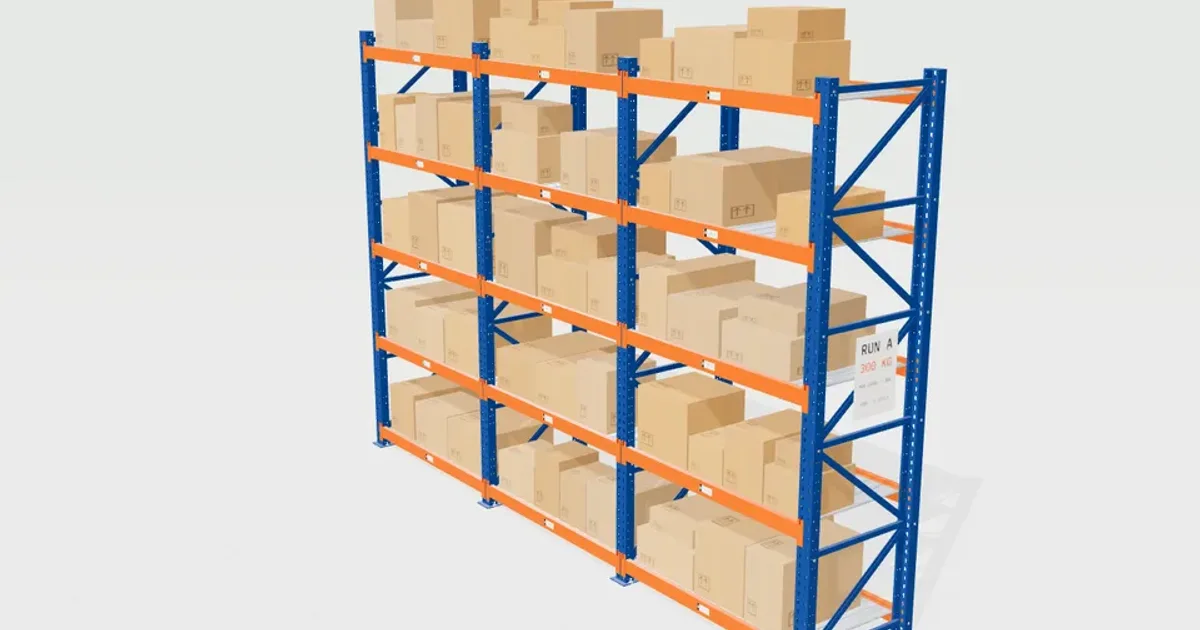
A made-to-order product configurator is three pieces of logic with a 3D view on top: rules that say whether a configuration is allowed, a bill of materials (BOM) that lists the parts, and a quote that prices them. If you keep them in plain code with no graphics, the 3D model becomes the easy part.
I built Rackwise, a configurator for a fictional maker of steel shelving. The buyer sets the run, the load and the finish, and gets a quote, not a cart, because made-to-order B2B orders are priced and confirmed by sales. Every price and capacity in it is illustrative.
One folder, no graphics#
The rules, the BOM and the pricing live in a folder of pure TypeScript with no Three.js or React in it:
config.ts: the options, the catalogue, presets and a share coderules.ts: the engineering checks and auto-fixbom.ts: part codes, quantities, weights, prices and CSV exportquote.ts: the price build-up
This separation has one practical payoff: tests. The rules and the quote run in Vitest with no browser, so a sweep over many configurations needs no browser.
Rules with one-click fixes#
The buyer sets bays (one to six), bay width, height (1.8 to 4.5 m), depth, levels, load per level and a duty class. The rules check things like beam capacity by class and span, frame capacity, level spacing, a stability limit on height against depth, and limits for castors and drawer units.
The capacity rules are deliberately simple and marked as illustrative. Beam ratings fall in proportion to span. The most loaded frame carries one bay. A run taller than four times its depth needs anchoring, either wall ties or back bracing, and eight times is the most the model allows.
When a check fails, the interface shows the reason and a fix next to it. There is also an auto-fix that changes the configuration until it passes. The tests run auto-fix over a grid of classes, widths, depths, heights, loads and level counts, and every case ends with no errors. I treat that as the most important test, because a fix that does not work is worse than no fix.
One source for the model and the BOM#
There is no model file. The rack is built in code from the same counts as the BOM: uprights, frame bracing, base plates, beams with connectors and lock pins, deck panels, and the add-ons such as back mesh, dividers, drawer units and end guards. When the counts change, both the picture and the parts list change, because they come from the same numbers. A BOM line and a mesh cannot disagree.
Clicking the model finds the part under the pointer and opens its BOM line, skipping the see-through areas of perforated and mesh parts. Clicking a BOM row highlights its parts in the model.
The quote#
The price is a build-up that the buyer can read, and the quote also shows a lead time:
- Parts, from the BOM
- Powder coat, as a surcharge by finish
- Volume discount tiers
- Assembly, from fitting minutes
- Delivery, by zone and weight
- VAT
Showing every line is a trust decision as much as a pricing one. The buyer can see where a price comes from.
The quote ends in a printable sheet with a snapshot of the current view. "Quote PDF" uses the browser's print to PDF, so there is no server step. The BOM can be downloaded as a CSV, and a demo request dialog stands in for sending it to sales. Nothing is sent anywhere.
The URL holds the configuration#
The whole configuration is in the address hash in readable form, so a link restores it. That is how a buyer can share a build with a colleague.
Keeping the 3D cheap#
Every part type is one instanced mesh, so a six-bay, eight-level run stays at a few dozen draw calls. Each instance stores an offset for the exploded view, which moves instances without rebuilding geometry. Three.js's InstancedMesh is the tool for this.
The location labels are one merged mesh over a single canvas atlas, so dozens of unique codes cost one texture and one draw call.
Rendering is on demand: a frame is drawn only when the camera glides, the explode eases or a part pulses, and the loop stops while the page is hidden or the viewer is off screen. The light tier drops antialiasing, shadows and bevels.
What is illustrative here#
The capacity rules are not engineering-approved, and a real manufacturer would replace them with their own tested data. The prices are made up. I have not tested the configurator with real buyers, so I cannot tell you whether the quote layout leads to more requests.