Expandable ad example: how expand works
A live expandable ad example: a 300×250 teaser that grows to 970×500 on desktop and full screen on phones, plus the container handshake and tracking.
· Updated · 4 min read
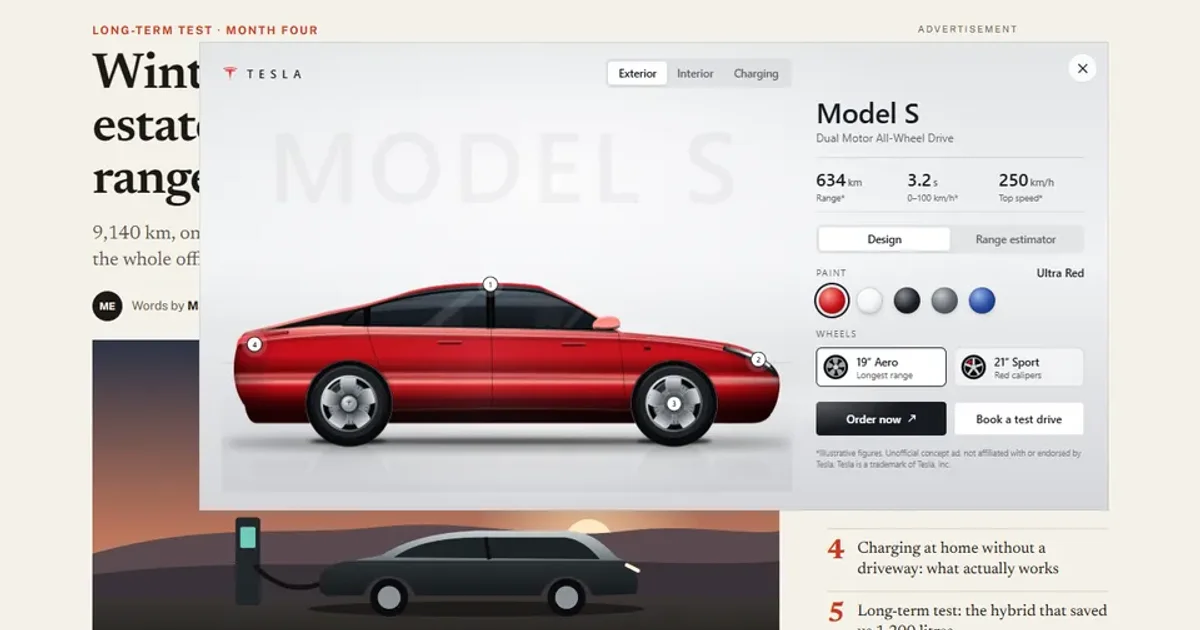
An expandable ad is a small unit that grows into a larger panel on a user action. The creative never resizes itself. It asks the page that hosts it, the page makes room, and the creative grows into the space it was given. That handshake is the whole trick.
I built one as a standalone package, a 300×250 teaser that expands to a 970×500 overlay on desktop and a full-screen panel on phones, and ran it on a mock publisher page in my Expandable Ad demo, which you can open and expand yourself. It is an unofficial concept for a car, not affiliated with the brand it shows, and every figure in it is illustrative.
The package#
It is a folder an ad server could traffic as is: index.html with the collapsed teaser and its styles inline, an ad.js, an expanded.css, an expanded.js and a backup.jpg. Everything uses relative paths, with no frameworks and no external requests. The head declares the collapsed size with <meta name="ad.size" content="width=300,height=250">, and the file defines var clickTag for the trafficker to override.
The teaser is CSS only. It plays three loops, about 20 seconds, and then rests on its end frame, as display specs ask. Only the small hover hint keeps pulsing. If you have not read the size and click-tag rules behind these choices, I wrote them up in HTML5 banner sizes, specs and size limits.
The container API#
On real in-app inventory the ad talks to a container through the IAB's MRAID standard. The IAB's MRAID 3.0 release says the API started out focused on expandable ads and now covers expanding and resizing, full-screen interstitials and orientation, and that the close control is standardised so the user always has a way out. I have not read the specification PDF in full. I know it from the IAB's announcement.
On the web, the host-side equivalent is usually IAB's SafeFrame or an ad-server API, and my handshake mirrors that pattern. My demo does not use a real MRAID SDK. The package exposes a small object, adkit, modelled on a subset of MRAID 2 (no resized or hidden state and no resize()): expand(), close(), getState() with the states loading, default and expanded, a stateChange event, and exit(name, url) and track(name).
The flow:
- The creative posts
expandto its parent page. - The host works out the placement, resizes the iframe and answers with a
stateChangethat carries the frame size and where the collapsed rectangle sits inside it. - The creative grows its panel out of that rectangle.
- Closing runs the other way: the panel shrinks back first, then the creative posts
collapseand the host shrinks the frame.
Messages are checked by source window, because the sandbox gives the frame an opaque origin. Opened on its own in a tab, the same package expands inside the window and exits with window.open(clickTag).
Expanding without moving the article#
On desktop the 970×500 panel is an overlay anchored to the slot's top-right corner. It is absolutely positioned, so the article underneath never moves. That is an overlay expansion, as opposed to a pushdown that shoves the page content down.
Phones, touch screens and windows too narrow for the panel get a full-screen panel that grows out of the slot. The page behind it is locked, and the example's own floating buttons are hidden until it closes.
Intent, not accidents#
An ad that opens whenever the pointer brushes past it is easy to trigger by accident.
- Mouse: half a second of hover intent before the ad expands. After a close, with the pointer resting where the small unit reappears, hover is re-armed only once the pointer has left, or the ad would reopen at once.
- Touch: a tap.
- Keyboard: Enter on the unit, and focus moves to the close button.
- Close: the × button or Esc. If a hotspot card is open, Esc closes that first.
Polite load#
Only the collapsed frame loads up front. The expanded styles, the SVG scenes and the panel logic are injected after both the ad's own load event and the host page's load event. The host says so in the handshake. If the visitor expands before that, the request is queued until the panel has arrived.
What gets measured#
The host counts what an ad server report would: impressions, sent once the collapsed frame has painted; the polite load; expansions with their trigger (hover, tap, click or keyboard); interactions with the panel; exits by name; collapses with their trigger; and the total time the ad stayed expanded. An inspector bar shows the live container state and the counters, with a log of every event.
Reduced motion#
The teaser shows its end frame, the panel opens and closes instantly, nothing drives in or sweeps, and figures appear at their final values. The host passes the setting to the frame, so it holds even if the frame cannot read the media query.
Missing from the demo#
This is a demo container and not an ad server. It has no real MRAID SDK, no viewability measurement and no impression pixels, and I have not trafficked the package through a real ad server. The ad has not run on live inventory.