Lofi generator with a Pomodoro timer, in your browser
Press Play and the page composes lofi as it goes: seventh chords, swung drums, a soft electric piano, vinyl crackle and rain, all made live in your tab. Move tempo, warmth, density and drums while it plays, and run a Pomodoro timer next to it whose music softens on breaks. Below are what makes lofi sound lofi, typical BPM, a short recipe and the Pomodoro numbers. The free Android app has 19 stations and 17 ambient layers, and plays offline.
Generate lofi in your browser
The same model as the app, with 6 of its 19 stations. Every press of New take composes a different song.
Study Room
78 BPM · swing 54 to 60 %
Press Play to start. Nothing plays until you do.
Mood
Mix
Warmth closes a low-pass from 14 kHz to 2.2 kHz and adds tape wobble and saturation. The app has 17 layers; this page has three.
Pomodoro with music
25:00
Ready
Focus 25, break 5, and a long break after 4.
Starting the timer starts the music. On a break the music turns sparse with no drums, then returns for the next focus session.
Timer lengths
One round is 130 minutes. New lengths apply from the next phase. Limits are the app's.
19 stations, 17 sounds and a focus timer
The player on this page is a small version of the same model. The Android app adds the full set of stations and ambient layers, a sleep timer and your focus stats:
- Lofi composed on your phone while you listen, so you never hear the same loop twice
- 19 stations, each with its own sound and painted scene; four are open at once and the other 15 open for a week after a short video
- 17 ambient layers with a slider each: rain, café, fireplace, ocean waves, night train, brown noise and more
- Four mood controls: tempo (slower or more upbeat), warmth (clear to tape-like), density (how many instruments play) and drums (off for sleep music)
- Pomodoro focus timer with your own focus and break lengths, a long break after every 4 cycles, minutes counted, a day streak, a weekly chart and 16 achievements
- Sleep timer from 15 to 60 minutes with a soft fade; 90 and 120 minutes or until morning open for the night after a short video
- Box breathing exercise, 17 hand-painted animated scenes, saved vibes, an optional daily focus reminder and dark and light themes
- Background playback with lock-screen controls, 26 languages, no account

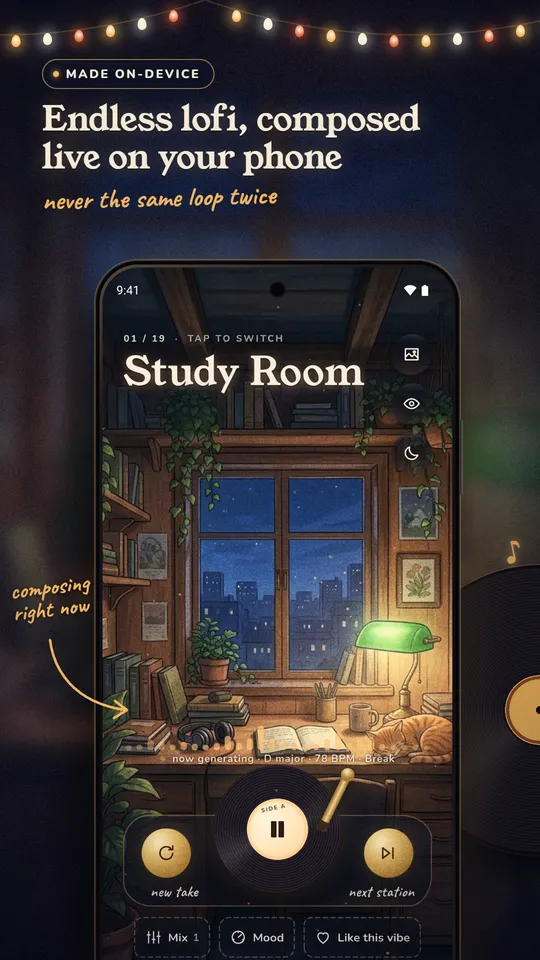
Endless lofi, composed live 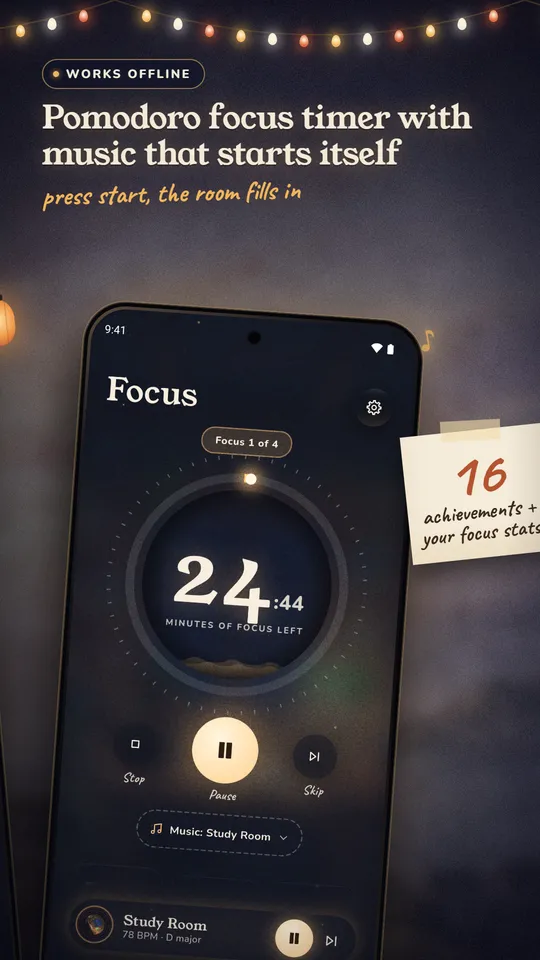
A focus timer that starts the music 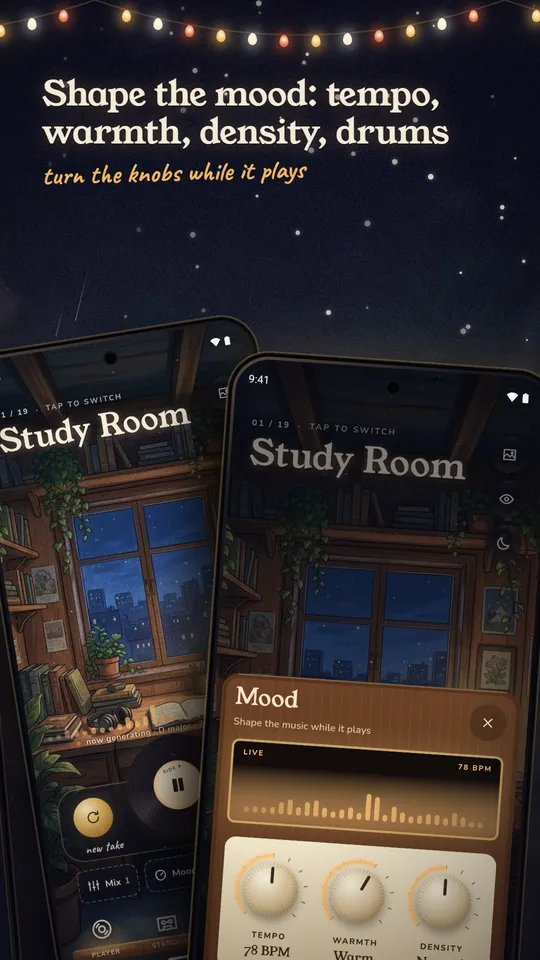
Tempo, warmth, density, drums 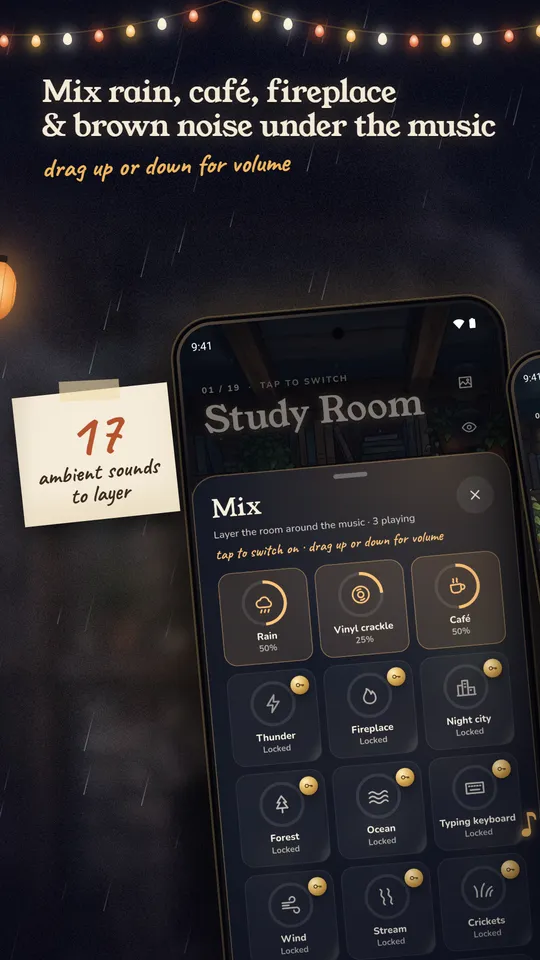
17 ambient sounds to layer 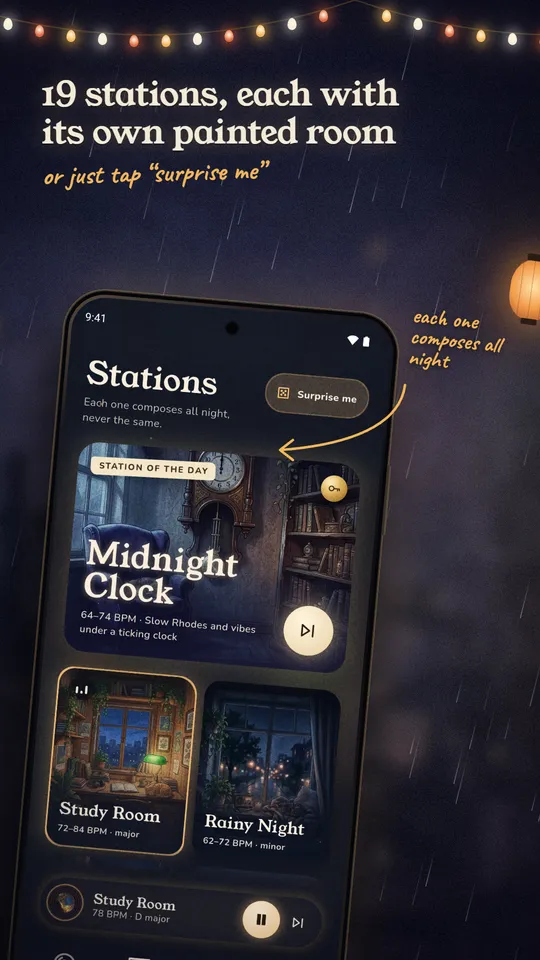
19 stations, each its own room 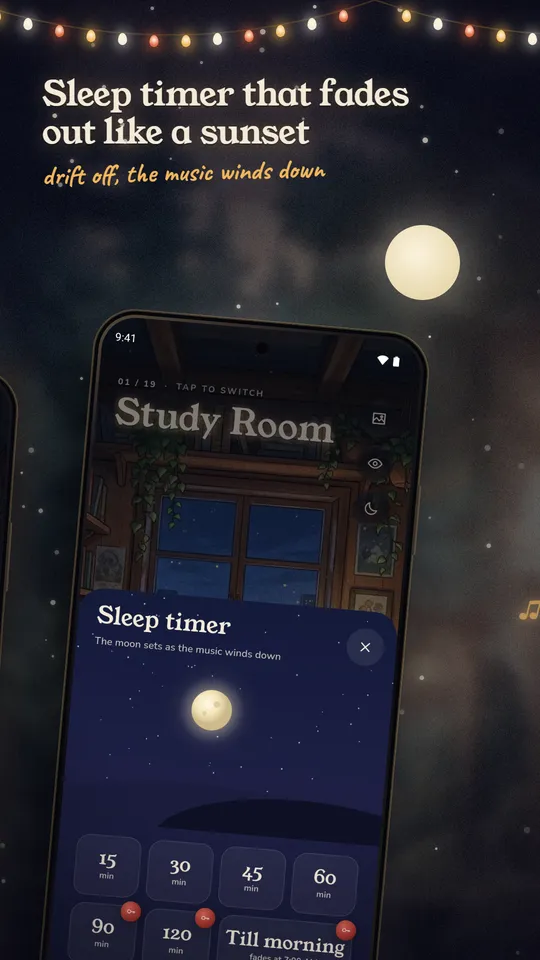
A sleep timer that fades out 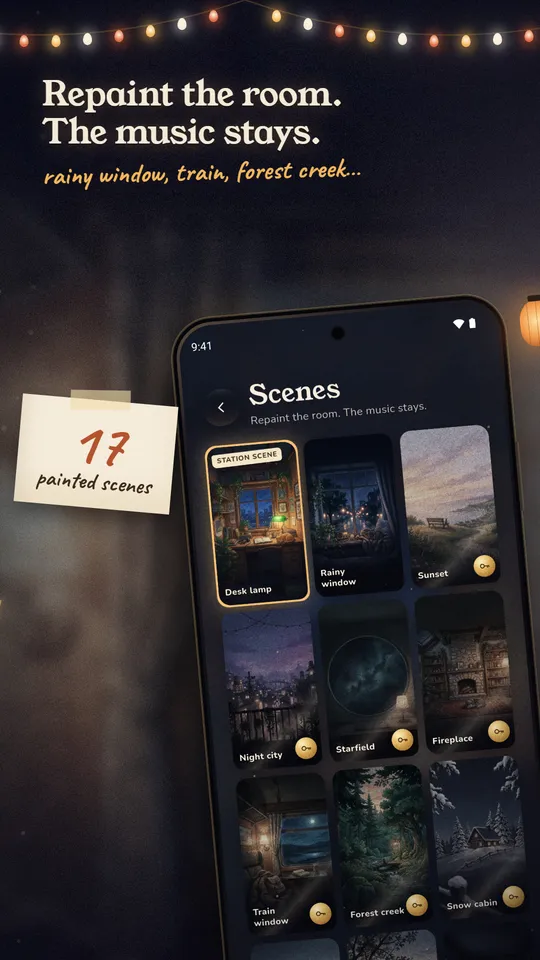
17 painted scenes 
A calm clock for your desk
What makes lofi sound lofi
Lofi is a mood built from a few cheap tricks. The chords come from jazz and neo-soul, the drums are loose, and the whole mix is made a little worse on purpose: dulled, wobbly and dusty. Producer guides such as Violet Recording, Mode Audio and RouteNote agree on the same short list. The right column shows how the player above does each one.
| Ingredient | What producers say | In the player |
|---|---|---|
| Swing | Drums sit slightly off the grid; about 55 to 62 % swing is quoted. | The second eighth of each beat is late by half of (swing − 50) / 100 of a beat, 52 to 62 % depending on the station. |
| Seventh chords | maj7, min7 and dominant 7, with the odd ninth. | Every chord is a seventh or a ninth, nine progressions in all. |
| Low-pass warmth | Roll off the highs so it sounds like it is playing from another room. | Warmth moves a low-pass from 14 kHz down to 2.2 kHz, and adds soft saturation. |
| Tape wobble | A slow pitch drift that should stay subtle. | A delay line moved by a slow sine (one cycle every 3.7 s) changes pitch by 0.2 to 0.4 % as Warmth rises. |
| Vinyl noise | A quiet crackle layer under the whole track. | Hiss with random clicks, with a level that follows Warmth. |
Lofi BPM: the typical range and how to choose
Most guides put lofi hip hop between 70 and 90 BPM (Violet Recording and RouteNote). Mode Audio gives a lower 60 to 80 and points out that standard hip hop sits around 90 to 100. Treat 60 to 90 as the working range; the sources do not agree on the edges.
The app does not use one tempo. Each station has its own range, and the Tempo control picks the low end (slow), the middle (medium) or the top (upbeat) of it. The six stations in the player use the app's real numbers:
| Station | Slow | Medium | Upbeat | Swing | Key |
|---|---|---|---|---|---|
| Study Room | 72 | 78 | 84 | 54 to 60 % | major |
| Rainy Night | 62 | 67 | 72 | 56 to 62 % | minor |
| Sleep Drift | 60 | 63 | 66 | 52 to 56 % | major |
| Jazz Café | 76 | 83 | 90 | 58 to 62 % | major |
| Tokyo Midnight | 70 | 76 | 82 | 54 to 58 % | minor |
| Snow Cabin | 60 | 63 | 66 | 52 to 56 % | major |
A rule of thumb from those numbers: the slowest stations (60 to 66 BPM, little swing, few instruments) are the quiet ones, and the jazz-leaning ones (76 to 90 BPM, 58 to 62 % swing) are the busy ones. Pick the tempo that stays in the background for what you are doing; nothing here is a measured result.
How the generator builds a song
A song starts from a random seed. The seed picks a key from the station's list, a swing value inside its range and a chord progression for each section. The form repeats intro, A, B, break, A', eight bars each, in 4/4. Drums sit out of the intro and the break, and on stations that have one the last bar of a section plays a drum fill. The same seed always gives the same song, so New take just picks a new seed.
Chords are placed close to the previous chord, with each voice moving as little as it can: that is voice leading, and it gives the lazy sound instead of jumps. The bass plays the chord root on beat one, sometimes repeats it, sometimes adds a passing tone and sometimes a note that leads into the next chord. The melody walks a pentatonic scale on the eighth notes, rests 40 to 60 % of the time, never climbs more than three steps in a row and leans toward chord tones. Density sets how many rests: sparse drops the melody, rich plays it most of the time and repeats the chord on beat three. Drums are 16-step patterns with ghost notes, accents, a little random timing and volume, and a few dropped hi-hats.
The nine progressions the stations draw from, written out in one key:
ii-V-I-viDm7 G7 Cmaj7 Am7 (C major)I-vi-IV-VCmaj7 Am7 Fmaj7 G7 (C major)iv-IFm9 Cmaj9 (C major)Imaj7-IVmaj7Cmaj7 Fmaj7 (C major)i-VI-III-VIIAm9 Fmaj7 Cmaj7 G7 (A minor)vi-IV-I-VAm7 Fmaj7 Cmaj7 G7 (C major)I-iii-IV-ivCmaj7 Em7 Fmaj7 Fm9 (C major)i-iv-VII-IIIAm9 Dm7 G7 Cmaj7 (A minor)I-IVCmaj9 Fmaj7 (C major)
How to make lofi: a short recipe
- Set a tempo between 70 and 90 BPM, or lower if you want it sleepier.
- Write a loop of two to four seventh chords. ii-V-I-vi is the classic jazz turnaround.
- Play the chords on a soft electric piano or guitar and keep the notes of each chord close to the last.
- Add a slow kick and snare, push the snare or hats off the grid or use swing around 55 to 62 %, and keep the hats quiet.
- Add a bass note on the root of each chord and a sparse melody from the pentatonic scale with plenty of rests.
- Roll off the highs with a low-pass filter, add a little pitch wobble and put a vinyl crackle or rain layer far underneath.
Steps 1 to 6 are what the player runs for you on every bar. In a music program the same list works by hand. Wobble is the one to go easy on: RouteNote calls it out as the effect not to push.
The Pomodoro method, with the numbers
Francesco Cirillo developed the technique in the late 1980s as a university student and named it after his tomato-shaped kitchen timer (Wikipedia). One work block, a pomodoro, is typically 25 minutes. A short break of 5 to 10 minutes follows, and after four pomodori comes a long break of typically 20 to 30 minutes. Sources differ on the break lengths, so the lengths are settings, not rules.
| Setting | Default | Range |
|---|---|---|
| Focus | 25 min | 15 to 60 min |
| Short break | 5 min | 3 to 15 min |
| Long break | 15 min | 5 to 30 min |
| Focus sessions before a long break | 4 | 2 to 8 |
With the defaults one round is 4 × 25 minutes of focus, 3 short breaks of 5 and one long break of 15: 130 minutes, a bit over two hours. At the shortest settings a round is 38 minutes and at the longest 615.
The Wikipedia article also cites a small study of 25 students using the technique and 35 taking breaks when they chose: the self-timed group worked longer stretches and reported more fatigue and lower concentration and motivation, with no difference in task completion. One study is not a verdict, and this page does not claim that any timer or any music makes you more productive.
The timer above counts real elapsed time, so a background tab that wakes late still lands on the right phase. With "Music follows the timer" on, the music turns sparse and drops the drums on a break, as the app does, and comes back for the next focus session.
Lofi for studying, focus and sleep
People use lofi as a steady, lyric-free sound under work, reading or bedtime. That is a habit, not a treatment, and nothing here claims it improves focus or sleep. If you try it, these settings make the sound recede:
- For long study sessions: a medium tempo, Density on normal, Warmth around 60 and a quiet vinyl layer, which is the Study Room default.
- For a plain background bed: turn Drums off and add brown noise or rain. Brown noise is a deep, steady hiss with more energy in the low frequencies.
- For bedtime: Sleep Drift runs 60 to 66 BPM, sparse, with no drums and Warmth at 85. Keep the volume low, and use a timer so it does not run all night. The app has a sleep timer for that: 15 to 60 minutes with a soft fade at the end.
Persistent trouble sleeping or concentrating is a question for a doctor, not for a music player.
What the Android app adds
The player on this page is a demo of the model, with synthesised sounds in your tab. The app is the full thing:
- 19 stations, each with its own painted, animated scene, against 6 here.
- 17 ambient layers with a slider each (rain, café, fireplace, ocean waves, night train, brown noise and more), against 3 here.
- A Pomodoro timer that starts the right music with every session and keeps your minutes, a day streak, a weekly chart and 16 achievements.
- A sleep timer, saved vibes, a box breathing exercise, an optional daily focus reminder and background playback with lock-screen controls.
- It plays offline once installed, has no account, and is in 26 languages.
Honest notes
- The app is free and supported by ads.
- Four stations are open at once. A short video unlocks any of the other 15 for a week. Rain, vinyl crackle and café are free from the start; the other layers unlock the same way, a week at a time. Longer sleep timers (90 and 120 minutes, or until morning) also unlock with a video, for that night.
- This page makes its sound only on your device, after you press Play. It records nothing, stores nothing and sends nothing.
- Browsers differ in how they treat background tabs. If the music stutters when the tab is hidden, keep it visible or use the app, which plays in the background.
Related: Guitar Tuner and Morse Code Trainer also make their sound live in the browser.
Questions
Is there a free lofi generator online?
Yes. The player at the top of this page is free, runs in your browser and needs no account. It composes a new song every time you press New take. The Android app is free with ads.
What BPM is lofi?
Most producer guides put lofi hip hop at 70 to 90 BPM; Mode Audio gives 60 to 80. The app's stations run from 60 to 90 BPM, with the slowest, around 60 to 66, for sleep and the jazz-leaning ones around 76 to 90.
How do I make lofi music?
Use a slow tempo, a loop of seventh chords, drums that sit slightly off the grid (swing of roughly 55 to 62 %), a low-pass filter, a quiet vinyl crackle and a very small pitch wobble. The short recipe on this page walks through it, and the player above does all of it for you.
Is a lofi generator the same as AI music?
Not here. The player and the app compose from rules: a random seed picks a key and chord progressions, and fixed patterns for bass, melody and drums are played with small timing and volume changes. There is no trained model and no server. The same seed gives the same song.
Can I use a lofi timer for Pomodoro sessions?
Yes. The timer next to the player runs 25 minutes of focus, 5 minutes of break and a 15-minute long break after every four sessions by default. You can change each length, and the music turns sparse with no drums on breaks.
How long should a Pomodoro break be?
The usual advice is a short break of 5 to 10 minutes after each 25-minute block and a long break of 20 to 30 minutes after four blocks. Sources differ, so treat the numbers as a starting point and adjust them.
Is the music copyright free?
The Play listing says every note and sound in the app is synthesised in-house by Zorya Tech Studio and released under CC0. This page only plays sound in your tab and has no recording or download, so there is nothing to reuse from it. Check the licence of any track before you publish it.
Does the Lofi Generator app work offline?
Yes, once it is installed. The app is free, supported by ads, and needs no account.

Take the music with you
Free on Android with ads. Four stations are open at once and a short video opens any of the other 15 for a week. It plays offline once installed, with no account.
Facts from the Google Play listing, last checked .