Favicons: the files a site needs
Which favicon files to ship, what Google Search requires, the icon tags and manifest this site emits, and a free generator that builds the whole set.
· Updated · 4 min read
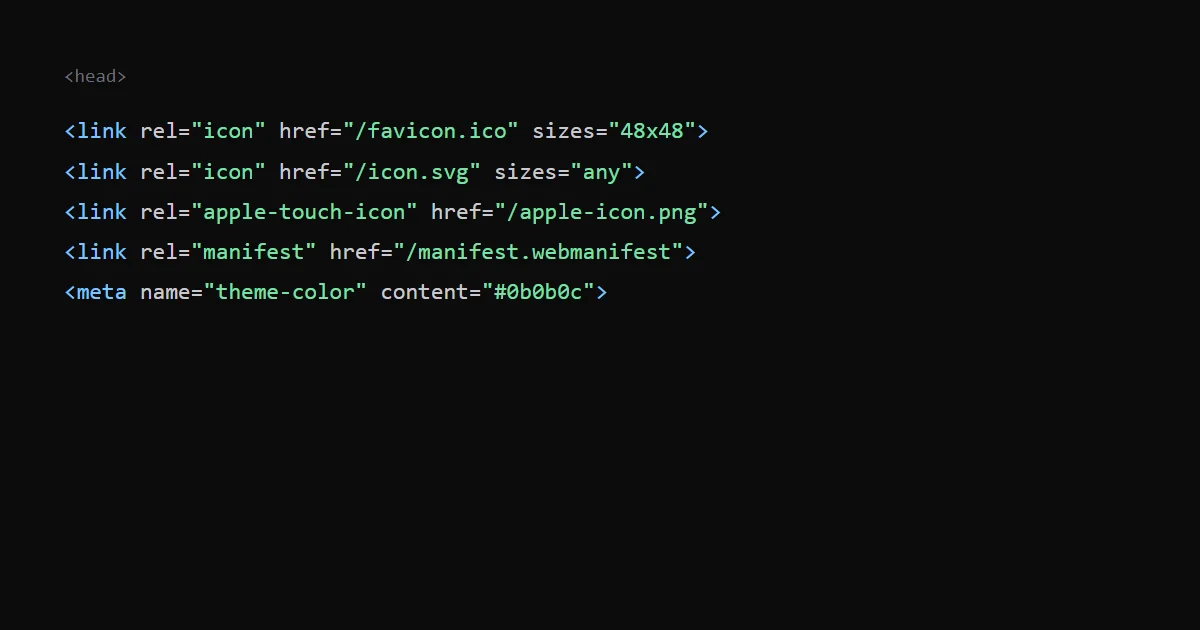
A site needs a small set of icon files: an ICO or PNG favicon for browsers and for Google Search, an Apple touch icon for iOS home screens, and 192 and 512 pixel PNG icons in the web app manifest. An SVG icon is a good extra for browsers that support it, but Google's documentation does not list SVG among the favicon formats it accepts.
Below are Google's rules, the files this site ships and the tags it produces, and a generator that builds the whole set from one picture.
What Google Search asks for#
Google's favicon guidelines say:
- Markup. Add a
linktag to the head of the home page, for example<link rel="icon" href="/path/to/favicon.ico">. Google acceptsiconand the historicalshortcut icon, and alsoapple-touch-iconandapple-touch-icon-precomposed. - One per hostname. Google Search supports one favicon per site, where a site is defined by the hostname. Home pages in subdirectories are not supported.
- Crawlable. Googlebot-Image must be able to crawl the favicon file, and Googlebot must be able to crawl the home page. Neither can be blocked.
- Square and at least 8 × 8 pixels. Google recommends going larger than 48 × 48 so the icon displays well on different surfaces.
- Formats. BMP, GIF, ICO, PNG, JPEG, PPM and TIFF. SVG is not on the list.
- Stable URL. The favicon URL must be stable.
- Representative. The icon should visually represent the brand.
- No promise. A favicon is not guaranteed to appear in Google Search results, even if all guidelines are met. Google says recrawling can take from several days to several weeks, and you can request indexing of the home page with the URL Inspection tool.
The set this site ships#
This site is a Next.js app, and it builds its icon tags from files in the app folder: favicon.ico, icon.svg and apple-icon.png. A script draws the ICO, the Apple icon and the two manifest PNGs from icon.svg. The home page head contains these tags:
<link rel="manifest" href="/manifest.webmanifest" />
<link rel="icon" href="/favicon.ico?..." sizes="48x48" type="image/x-icon" />
<link rel="icon" href="/icon.svg?..." sizes="any" type="image/svg+xml" />
<link rel="apple-touch-icon" href="/apple-icon.png?..." sizes="180x180" type="image/png" />
<meta name="theme-color" content="#0b0b0c" />
The strings after the question marks are content hashes that Next.js adds, so the URL changes only when the file does. The manifest lists two icons, a 192 × 192 and a 512 × 512 PNG, which Android and installed web apps use.
Two things in that list are worth noticing:
- The ICO holds 16, 32 and 48 pixel images, so its largest is 48 × 48. That meets Google's minimum, but Google recommends larger than 48 for different surfaces, and the 180 × 180 Apple touch icon is larger. I have not tested what Google Search shows for this site.
- The SVG scales to any size, but since Google's list leaves SVG out, Google can use the ICO or the Apple touch icon, which it also accepts.
What each file is for#
| File | Used by | Notes |
|---|---|---|
favicon.ico | Browser tabs, Google Search | The widest support. This site's packs 16, 32 and 48 pixel images. |
icon.svg | Modern browser tabs | Scales to any size. Not on Google's list of formats. |
apple-icon.png (180 × 180) | iOS home screen | Linked as apple-touch-icon. |
icon-192.png, icon-512.png | Web app manifest | Android home screen and installed apps. |
manifest.webmanifest | Browsers that install web apps | Names the app and lists the icons. |
theme-color tints the browser toolbar on phones. It is not an icon, but it belongs with this set.
Build the set from one picture#
Making each size by hand is slow. My Favicon Generator takes one image and makes an ICO, PNG icons, an Apple touch icon and a web manifest, then shows the head tags to paste in. It runs in your browser, so the picture is not uploaded. The tags it prints are a little different from this site's set: it adds 16 and 32 pixel PNG icons and a maskable icon, and it adds an SVG tag only when you start from an SVG.
Check it#
- Open your home page source and look for the
rel="icon"tags. - Request each icon URL directly and confirm it returns an image and not an error page.
- Make sure
robots.txtdoes not block the icon files or the home page, because Google needs both. - After a change, request indexing of the home page and wait. Google says it can take weeks.
Limits of this post#
The Google rules are from the page I read on 18 October 2026, and they change. I did not check what Safari or Android show for this site's icons in every case. The tags I list are from my own build output.