Hover video previews that load on demand
How Lab cards play a clip on hover while the page loads a 30 KB still: preload none, src on first hover, no clip on touch, Save-Data or reduced motion.
· 3 min read
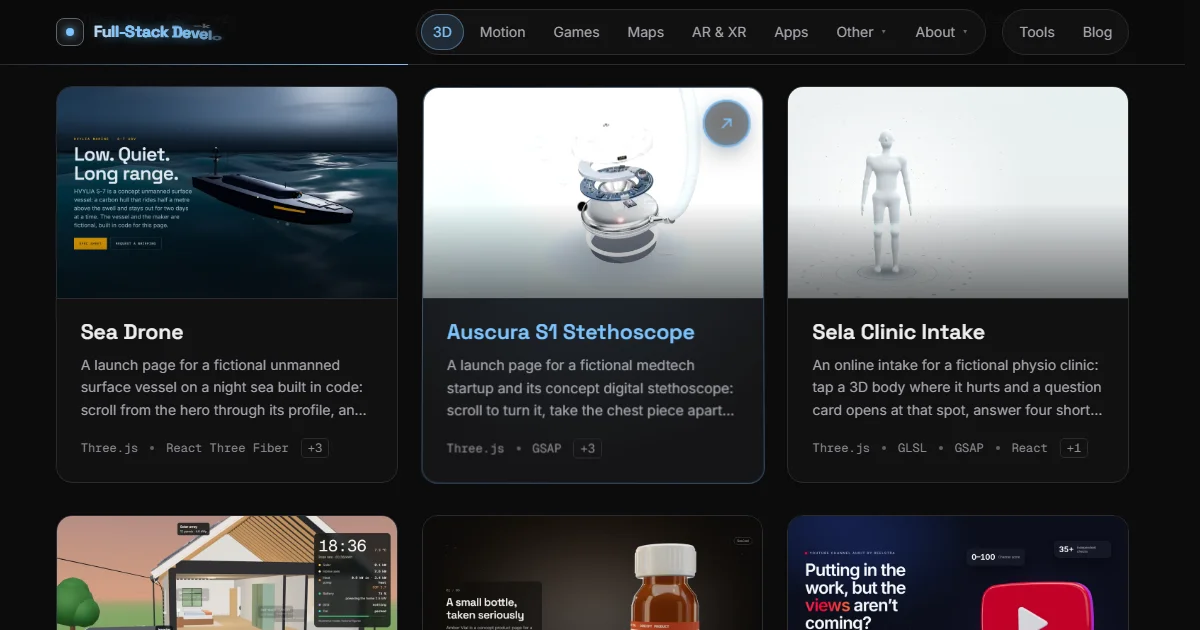
A card can play a video on hover and still cost the page almost nothing: ship a WebP still, put an empty <video preload="none"> over it, set the clip's src only on the first hover, and fade the video in when it fires playing. On this site a page of cards loads only the stills, around 30 KB each, and a clip of about 100 KB arrives when someone points at a card.
You can try it on any topic page of the Lab, such as 3D: point at the Rune Cast card and the stones start to fall.
What a page of cards would cost otherwise#
I have 38 card clips right now. The smallest is 40 KB, the middle one about 107 KB and the largest 747 KB. The 3D topic page alone has 14 cards, so autoplaying every clip would add more than a megabyte before the visitor has done anything. Even preload="metadata" makes the browser open a connection per video and fetch the start of each file.
The stills are cheaper by a factor of three or four: 41 of them, median 29 KB, largest 94 KB.
The markup#
<img src={src} alt={alt} loading="lazy" decoding="async" />
<video
  ref={ref}
  muted
  loop
  playsInline
  preload="none"
  aria-hidden="true"
  tabIndex={-1}
  data-playing={playing || undefined}
  onPlaying={() => setPlaying(true)}
/>
The <video> has no src at all in the HTML, so preload="none" is only a second guard. It is muted and playsInline because browsers allow autoplay only for muted video, and iOS would otherwise open a fullscreen player. It is aria-hidden with tabIndex={-1}: the clip is decoration, and the card's title and the still's alt text already say what the example is.
The first hover loads the clip#
const enter = () => {
  if (!v.getAttribute("src") && video) v.src = video;
  v.currentTime = 0;
  v.play().catch(() => {});
};
The listeners sit on the card, not on the video, and they handle focus and blur as well as pointerenter and pointerleave, so keyboard users get the same preview when they tab to a card. Leaving pauses the clip. The second hover reuses the file the browser already has.
play() returns a promise that rejects when the browser refuses playback. The catch swallows it on purpose: the still is already there, so a refused clip just means no motion.
No black flash#
A video that has just been given a source is black until its first frame decodes. If it is visible at that moment, the card blinks. The video starts at opacity: 0 and only the playing event sets data-playing, which fades it in over 400 ms:
.example-card__poster > video {
  position: absolute;
  inset: 0;
  object-fit: cover;
  opacity: 0;
  transition: opacity 400ms var(--ease-out);
  pointer-events: none;
}
.example-card__poster > video[data-playing] {
  opacity: 1;
}
The video covers the still exactly, so nothing moves when it appears and there is no layout shift. The CLS post has more on why fixed media boxes matter.
When there is no clip at all#
Three cases skip the video entirely:
- Reduced motion. With
prefers-reduced-motion: reducethe<video>element is not rendered, so it cannot load or play. - Touch screens. The listeners are added only when
matchMedia("(hover: hover)")matches. A phone has no hover, and a tap opens the example, so a clip there would be wasted bytes. - Save-Data. When
navigator.connection.saveDatais true, the visitor has asked for less data, and a decorative clip is the first thing to drop. Only Chromium browsers expose this flag; elsewhere it is simply absent and the check passes.
How the clips are made#
Every clip comes from the real example, not from a screen recording edited by hand. A Playwright script opens the example in a ?shot mode, records frames with the Chrome DevTools Protocol screencast, and re-times them to a constant 30 fps with an ffmpeg concat list, because screencast frames arrive at uneven intervals. Then one encode:
ffmpeg -f concat -i list.txt \
  -vf "fps=30,scale=640:400:flags=lanczos,format=yuv420p" \
  -c:v libx264 -preset slow -crf 27 -profile:v high \
  -an -movflags +faststart card.mp4
640×400 is enough for a card up to 320 CSS pixels wide on a 2× screen. -an drops the audio track, which a muted preview never needs. +faststart moves the index to the front of the file, so playback starts before the whole clip has arrived.
The still is the same frame the clip is built around, saved at 960×600 as WebP quality 80, plus a 480-pixel copy for the smaller tiles on the home page. To shrink a still of your own to a target size, the image compressor does it in the browser, and AVIF vs WebP vs JPEG covers which format to pick.