How I test a playable ad before upload
My playable ad preview rig: mock MRAID, ExitApi and Meta SDKs in a sandboxed iframe, a viewability pause, a first-touch clock and real device sizes.
· 4 min read
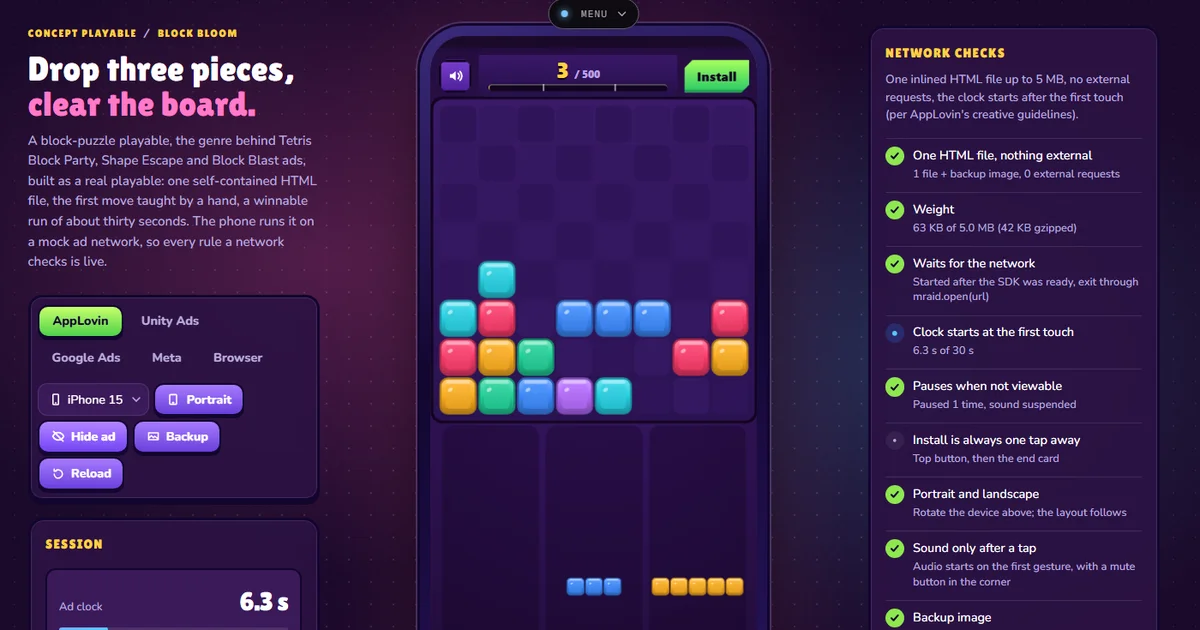
I test a playable ad by running the exact file I would upload inside a sandboxed iframe, with a fake ad-network SDK injected in front of it, and by watching what the ad reports back. The rig lets me switch networks, hide the ad, rotate the phone and change the device, and it ticks off the rules a network reviewer would check.
You can use the rig on three Lab examples: Block Bloom, Fairway Flick and Sniper Rescue. The rules per network are in Playable ad specs; this post is about checking an ad against them.
The ad is one file, and the rig loads that file#
Each playable is built into one HTML file with the script and styles inlined: 63 KB for Block Bloom, 76 KB for Fairway Flick and 95 KB for Sniper Rescue, against the 5 MB AppLovin and Unity allow. The preview fetches that file once and puts it in an iframe through srcdoc:
<iframe sandbox="allow-scripts allow-popups" srcDoc={wrap(html)} />The sandbox has no allow-same-origin, so the ad cannot read the page, its storage or its cookies, which is close to how a network isolates a creative. allow-popups is there because the last fallback for the install button is window.open.
A fake SDK per network#
wrap() injects a small script before the ad's own code. For AppLovin and Unity it is an MRAID 3 object with getState(), isViewable(), addEventListener() and open(). For Google it is ExitApi.exit(), for Meta FbPlayableAd.onCTAClick(), and the Browser setting injects nothing, so the ad has to fall back to its clickTag. Every call the ad makes goes back to the page with postMessage, and the page shows a toast such as "Exit mraid.open → store URL".
These are mocks with the real names and call shapes, not the networks' code. They catch the common mistakes: calling mraid.open before ready, starting the game before the SDK says the ad is visible, or an install button that only works on one network. They cannot catch a network's own bugs or its review rules on content.
The ad's install handler tries each API in turn, so the same file works everywhere:
const url = window.clickTag || storeUrl;
if (window.mraid?.open) window.mraid.open(url);
else if (window.ExitApi?.exit) window.ExitApi.exit();
else if (window.FbPlayableAd?.onCTAClick) window.FbPlayableAd.onCTAClick();
else window.open(url);
Viewability is a button#
A network tells an MRAID ad when it scrolls out of sight with viewableChange. The ad must pause its game and its sound. The rig sends the same signal in two ways: an IntersectionObserver reports the phone as not viewable when less than 40 % of it is on screen, and a Hide ad button forces it. The phone dims, the ad posts a pause event, and the checklist marks "Pauses when not viewable" as passed only after it has seen that event.
The clock starts at the first touch#
Networks count play time from the first interaction, not from load, and expect the end card within a fixed time. The ad sends first_interaction, and the rig's ad clock runs from then, minus any time spent paused. Each of the three ads forces its end card 30 seconds after the first touch, and the meter under the clock fills towards that line.
Real device sizes, not a stretched frame#
In the first version the phone was drawn at one aspect ratio and the iframe filled it, so the ad saw whatever size the drawing had on my screen. The iframe now gets the CSS size of a real device (393×852 for an iPhone 15, 375×667 for an iPhone SE, 412×915 for a Pixel 7, 320×480 for the classic MRAID interstitial, 744×1133 for an iPad mini) and is scaled down with a transform to fit the drawing, by whichever side is tighter, and centred:
const scale = Math.min(screen.w / vp.w, screen.h / vp.h);
<iframe style={{ width: vp.w, height: vp.h, transform: `translate(${offX}px, ${offY}px) scale(${scale})`, transformOrigin: "0 0" }} />
The ad's media queries and layout now run against the real width and height, which is what matters for a tray of pieces at the bottom of a 667 px tall SE screen. The label under the phone shows the CSS size being emulated.
A timeline and a report for the ticket#
The session panel draws every event on a time axis from the moment the ad was ready: the first touch, each move the game reports, pauses, the end card and install taps, with a dashed line at the forced end. A run where the end card comes late, or where nobody can tap install before it, is visible at a glance.
The Copy QA report button writes the session as plain text for a bug tracker: network, device and orientation, time to first touch, play time, the game's own counters, every check with [x] or [ ], and the event list with timestamps. It replaces the screenshot and a paragraph I used to write by hand.
What the rig cannot tell you#
It does not measure how a network's own wrapper loads the file, and it does not test on a real phone's GPU or touch screen. Before trafficking I still upload to each network's own preview tool. The rig is for the hundred small changes before that, so the network preview only has to confirm.
For banners rather than playables, the HTML5 banner checker runs a similar set of checks on a ZIP, and the playable ad tester takes your own playable file.