Playable ad specs: AppLovin, Unity, Meta
AppLovin and Unity take one 5 MB HTML file, Google Ads a 5 MB ZIP, Meta 2 MB. Size, install call and orientation for each network, from their docs.
· Updated · 7 min read
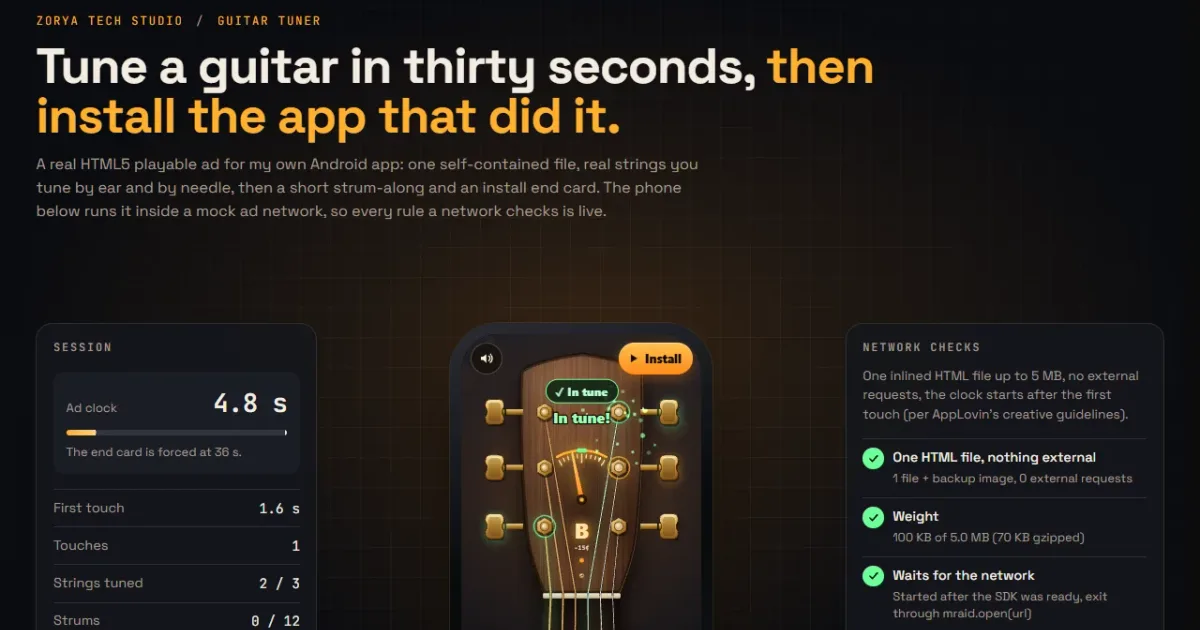
A playable ad is usually one HTML file (Google Ads wants a ZIP) that starts fast, stays under 5 MB (2 MB on Meta), loads nothing from outside, and ends on a network-specific "install" call. The numbers are easy to look up. The install calls differ per network, and a wrong call means the click never registers.
I built a real playable for my own app, Guitar Tuner, and then built a tester for the rules I kept tripping over. Below is the rule sheet I wanted at the start, with each number traced to the page it came from.
The limits, side by side#
I read AppLovin's, Unity's and Google's own help pages. For Meta I could only confirm the numbers through a search result of its Business Help Center page, because the page itself did not load for me, so check it before you upload.
| Spec | AppLovin | Unity Ads | Google Ads (App campaigns) | Meta |
|---|---|---|---|---|
| Package | One HTML file | One index.html, no links to other files | ZIP | One HTML file, or a ZIP |
| Size | 5 MB | Under 5 MB, inlined and minified | 5 MB per ZIP | Under 2 MB for the HTML; a ZIP up to 5 MB with index.html under 2 MB |
| Files | 1 | 1 | 512 per ZIP, 20 ZIPs per ad group | Up to 100 in a ZIP (third-party source) |
| External requests | None, everything in base64 or base122 | None | Relative paths only; Google Fonts and a few Google-hosted libraries allowed | No dynamic external assets |
| Install call | mraid.open(url) | mraid.open(url) (MRAID 3.0; the call is from older SDK docs) | ExitApi.exit() | FbPlayableAd.onCTAClick() (third-party source) |
| Orientation | Portrait and landscape both | Portrait and landscape both | ad.orientation meta tag | Portrait |
Sources: AppLovin creative guidelines, Unity creative specifications, Google Ads help: HTML5/Playable ads for App campaigns, Meta specifications for playable ads (read through a search result), and PlayCanvas's Meta guide for the CTA call.
Many "playable specs" posts say every network allows about 5 MB. Meta's HTML limit is lower, and I would design for 2 MB if the ad will ever go there.
The install button is where networks disagree#
Every network wants a different call when the player taps install. A direct window.open(storeUrl) is wrong on all of them, because the network has to know a click happened.
- AppLovin says to use
mraid.open()for click-through, "otherwise click-through fails". The first tap must not send the player to a store. - Google wants Google's
exitapi.jsscript in the<head>andExitApi.exit()on the button. Leave the script out and Google adds its own "Install" button instead of yours. - Meta wants
FbPlayableAd.onCTAClick(), and third-party guides say nomraid.js.
I handle this with one function that checks which SDK is on the page:
function cta() {
  const url = window.clickTag || STORE_URL;
  if (window.mraid?.open) window.mraid.open(url);
  else if (window.ExitApi?.exit) window.ExitApi.exit();
  else if (window.FbPlayableAd?.onCTAClick) window.FbPlayableAd.onCTAClick();
  else window.open(url, "_blank", "noopener");
}
The last branch keeps the ad working when you open the file from your desktop.
Two rules that shape the design#
AppLovin states both of these, and they are good rules for any network.
Audio stays muted until the first touch. Google says the same: sound must not start before the player interacts. For an ad about a guitar tuner this is awkward, because the product is sound. So the audio context is unlocked on the first touch, and the strings ring from the moment the player grabs a peg.
The ad clock starts at the first touch, not at load. AppLovin's wording is that the timer "must start only after the first user interaction". My ad has a hard end at 36 seconds, so the end card shows up whatever the player is doing, and the 36 seconds are counted from that first touch.
Two more habits: wait for MRAID's ready event before you start, and pause when the ad is hidden. The start code is short:
const m = window.mraid;
let started = false;
const begin = () => {
  if (started) return;
  started = true;
  start();
};
const afterReady = () => {
  if (m && !m.isViewable()) m.addEventListener("viewableChange", (v) => v && begin());
  else begin();
};
if (m && m.getState() === "loading") m.addEventListener("ready", afterReady);
else afterReady();
Pausing on viewableChange and on visibilitychange covers both the SDK case and the browser case. Without it the ad keeps playing sound after the player has swiped away.
Why the file is small: synthesise, don't ship#
The Guitar Tuner file is 50 KB of HTML, about 100 KB with its backup image. A 5 MB ceiling sounds generous until you add audio. Recorded plucks for six strings, in several takes each, would have to sit inside the file as base64, and every second of audio adds up fast.
So the strings are computed at runtime. A Karplus-Strong plucked string is a short burst of noise fed through a delay line that averages itself, and the delay length sets the pitch. The code is about 100 lines.
Tuning is the whole point of this ad, so the pitch has to be right. A delay line with a whole number of samples is off by up to 8 cents on a high string, which a guitarist hears. I read the delay with linear interpolation, and the unit tests render each string and read the pitch back with an autocorrelation, landing within 2 cents.
The picture follows the same idea. The guitar head, pegs and needle are drawn on a canvas in code. The only binary inside the file is a 4 KB app icon, and the backup image sits beside it as a separate file.
What the 36 seconds do#
None of the AppLovin, Unity or Google pages sets an ad length, so this part is my own design, not a network rule. The ad has three phases:
- Tune three strings by dragging pegs. A string counts as tuned after it stays within 6 cents for 380 ms, so a needle that only sweeps past zero does not count.
- Strum along with a chord sequence, 12 strums on the beat.
- An end card with a result line built from what the player did, such as "3 strings tuned · 9 perfect strums", and the install button.
One detail made tuning feel fair: the peg slows down near the target. Within 14 cents, a pixel of drag moves the pitch less than half as much as it does further away, so the last few cents are reachable with a thumb.
The store link carries a campaign tag, so installs from the ad can be told apart. I have not run it as a paid campaign, so I have no install numbers to quote.
Test before you upload#
Each network plays the ad in its own wrapper, which behaves differently from your browser tab. I run these checks on every build:
- The file loads nothing from outside (a stray font link counts).
- The exit call for the target network is in the code.
- The ad starts only after MRAID reports ready.
- It pauses and goes quiet when hidden.
- It works in portrait and landscape.
- It stays under the network's size limit.
The Playable Ad Tester runs them on a file in your browser, with mock AppLovin, Unity, Google, Meta and Mintegral SDKs around it, and the file never leaves your device. Display banners have their own ZIP rules, which the HTML5 Banner Checker covers.
AppLovin pre-upload checklist#
These are the rules on AppLovin's creative guidelines page, as of October 2026. Pick AppLovin in the Playable Ad Tester and it checks the ones a script can see.
- One HTML file, 5 MB or smaller, with every resource embedded as base64 or base122.
- No external network calls.
- MRAID 2.0: wait for the
readyevent before calling any MRAID API or deciding on layout. - Click-through goes through
mraid.open(), never on the first tap, and never without a tap. - The ad works in both portrait and landscape.
- The timer starts at the first touch, and sound stays muted until then.
- Sound stops when the ad closes or is hidden.
- With WebGL, show an HTML fallback if it fails to start or loses its context.
Then preview the file on AppLovin's own Playable Preview page, which the same guidelines point to.
What I could not check#
My playable has been tested against mock SDKs only. It has not run inside a live network, and I have not heard the audio on a real phone either, because headless Chromium plays no sound. Third-party spec summaries disagree with each other on Meta's file count and on AppLovin's mraid.open for tracking links, so I used official pages wherever I could find them. I found no official Mintegral specification, so the tester's Mintegral profile rests on third-party documents and is marked that way.
Specs change. Treat the table above as the state on 18 October 2026 and check the source pages above when you build.
How I check a playable against these rules before upload, with mock SDKs, a viewability pause and real device sizes, is in How I test a playable ad before upload.