Skip to content links: how to build one
How a skip to main content link meets WCAG 2.4.1, the HTML and CSS it needs, the mistakes that break it, and how to test it with the Tab key.
· 4 min read
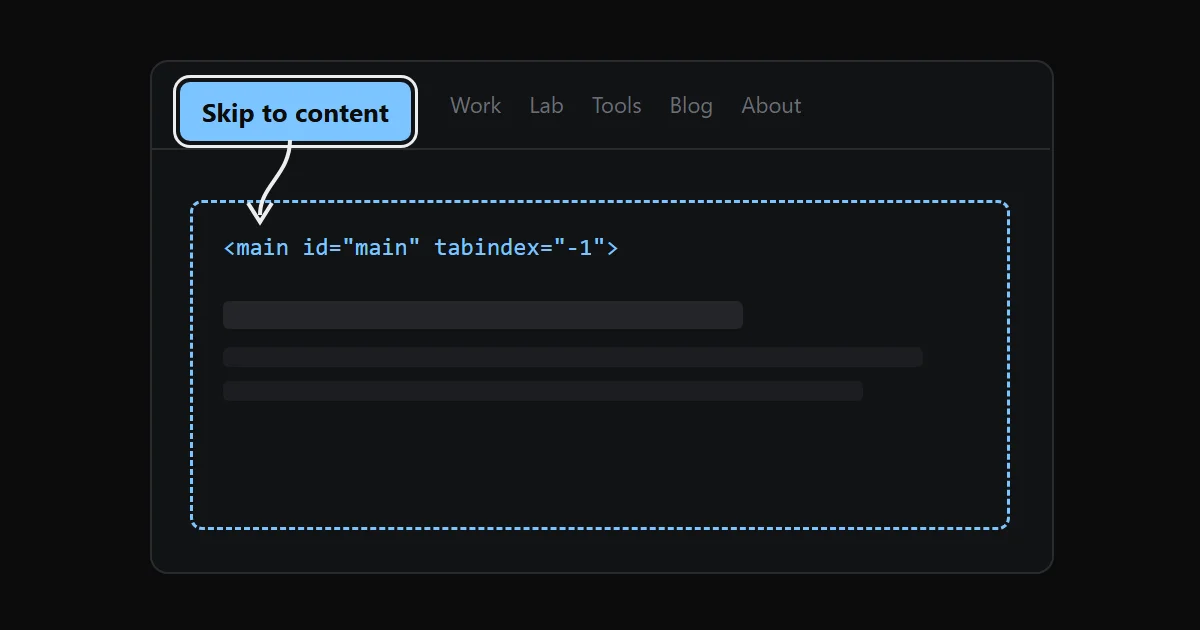
A skip link is the first focusable element on the page. It stays hidden until a keyboard user presses Tab, then it appears, and pressing Enter moves focus past the header and navigation straight to the main content. It is the most common way to meet WCAG success criterion 2.4.1, Bypass Blocks.
This site has one: a fixed link in the root layout that jumps to <main id="main">.
What WCAG 2.4.1 asks for#
The criterion is Level A, so every site that targets AA has to meet it. The W3C text is one sentence: "A mechanism is available to bypass blocks of content that are repeated on multiple web pages."
It does not require a skip link. The sufficient techniques include a link at the top of the page to the main content (G1), ARIA landmarks (ARIA11) and headings at the start of each section (H69). Landmarks and headings help screen reader users, who can jump between regions with a shortcut. A sighted keyboard user without a screen reader has no such shortcut, and for them the skip link saves a dozen or more Tab presses on every page.
The markup#
Two pieces: a link with an href that points at an id, and the element that carries that id.
<body>
  <a class="skip-link" href="#main">Skip to content</a>
  <header>…navigation…</header>
  <main id="main" tabindex="-1">…</main>
</body>
The link must come before the header in the DOM, so it is the first thing Tab reaches. Use a real <a href>, not a <button> with a script. A fragment link works before JavaScript loads, and it moves the browser's sequential focus starting point to the target.
tabindex="-1" on <main> makes the element focusable by script and by fragment navigation without adding it to the Tab order. Browsers today move the focus starting point to the fragment target even without it, but with it, focus lands on <main> itself, so screen readers announce the region and the next Tab goes to the first link inside it. Since <main> now takes focus, it will draw a focus outline. I remove the outline on <main> only, because it is not a control and a ring around the whole page reads as a bug.
The CSS#
Hide the link off-screen until it has focus, then bring it back:
.skip-link {
  position: fixed;
  top: 0.75rem;
  left: 0.75rem;
  z-index: 60;
  transform: translateY(-5rem);
}
.skip-link:focus {
  transform: translateY(0);
}
On this site that is a few Tailwind classes on the component: fixed top-3 left-3 z-[60] -translate-y-20 focus:translate-y-0. The header is sticky with z-50, so the link sits one layer above it. If the header were on top, the link would get focus behind it, which also fails WCAG 2.2's Focus Not Obscured (Minimum), 2.4.11.
I use :focus here, not :focus-visible. The link only matters for keyboard users, and keyboard focus matches both, but :focus also covers the rare case where a script moves focus to it. Give it the same contrast as any other button; mine uses the accent colour with its paired text colour. The contrast checker will tell you whether the pair passes 4.5:1.
Mistakes that break it#
display: noneorvisibility: hidden. Both remove the link from the Tab order, so it can never receive focus. Hide it with a transform or by positioning it off-screen.- An
hrefthat matches noid. A typo, or a layout where<main>has noidon some templates. Nothing happens on Enter, and an automated scanner will not catch it. - A sticky header covering the target. Focus moves, but the start of the content sits under the header.
scroll-margin-topon the target, equal to the header height, fixes the scroll position. - Smooth scroll libraries swallowing the jump. If a script intercepts every same-page link to animate the scroll, check that focus still moves, not only the scroll position. On this site the click handler of my Lenis wrapper only reacts to links to another path, so the skip link keeps the browser's default behaviour. Lenis itself is off under reduced motion; I wrote about that in Lenis and reduced motion.
- A translated site with an English label. This site renders "Skip to content" in English and "Перейти до вмісту" in Ukrainian from the same UI string table as the rest of the chrome.
How to test it#
Automated tools can check that the target exists, but not that the link works. Test by hand, in each browser you support:
- Load the page and click the address bar, or reload, so focus starts at the top.
- Press Tab once. The skip link should appear, visible and fully on screen.
- Press Enter. The view should move to the main content.
- Press Tab again. Focus should land on the first link inside the main content, not on the first link of the header.
Step 4 is the one people skip. If focus goes back to the header, the link moved the scroll position but not the focus starting point, and the link does nothing for the person who needs it.
On macOS, Safari does not move focus to links with Tab by default. Turn on "Press Tab to highlight each item on a webpage" in Safari's Advanced settings before you test there.
Where it fits with the rest#
A skip link is one item on a short list of keyboard basics: a visible focus ring on every control, a logical Tab order, targets big enough to hit. I covered the target size rule in WCAG 2.2 target size: the 24 pixel rule, and pages with motion need the reduced motion path described in How long should a UI animation take?.